
QUICK! Click on over to my Expert Groundwork page now and…..
Scroll down to lookie at the testimonials.
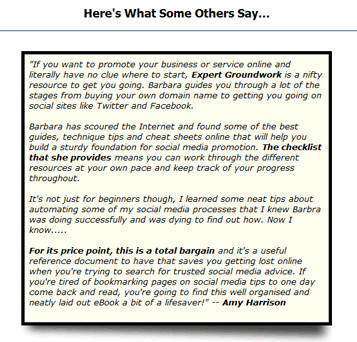
See that really coolio shadow and box structure?
I don't know about you, but I love it! It's a very simple, very basic, very nifty way to get things to pop out at you online….AND…
Here's how to do it!
Step 1.) You first need a table shadow image.
Feel free to steal mine (right-click over the image and save it to your site).

Step 2.) Put each testimonial in a table box with the following style attributes:
- border: 5px solid black;
- width: 480px
- align:center
- bgcolor:ivory
- cellpadding:5px
This makes the cute little table.
Step 3.) Write your testimonial, close off your box and IMMEDIATELY AFTER, include the table shadow image.
Can you believe, that's all? Here's a text example to show you exactly what I mean:
HTML for Make Your Testimonials Stand Out!
and here's the example in action:
Screenshot For Make Your Testimonials Stand Out!
Now let me answer some questions that might be moseying around in your mind.
You can edit your table code from directly within your WordPress posts. You can use Dean's FCK Editor to make it really easy as well.
You can also use CSS to add shadows as well! Here's some resources for that:
Is that cool or what?
Remember, when you're writing marketing copy….you want to highlight your testimonials as much as possible! The above way is simply one method that's absolutely….free.
Hope you enjoy!
Barbara Ling


 Get Started Here
 You’ll love what you learn… Promise!