

Morning!
Ever wake up one morning and figure out the most PERFECT domain name?
Ever want to get it cheaper?
‘Course you probably have! After all, saving money can only be described as a Very Good Thing indeed!
What’s that? You do NOT want to watch that incredible video above? Alrighty then, read on.
The best news is, it’s painfully simple to boot! And here’s how you do it.
Step 1.) Search for "godaddy coupon"
ie,
Step 2.) Click on something like:
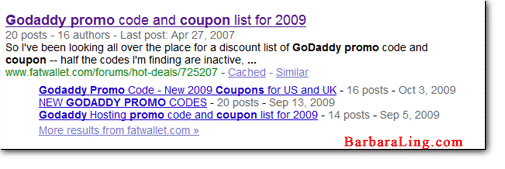
Step 3.) Go to the LAST page about Godaddy Coupons.
Chances are, you’ll see something like:
I am renewing a 2 year domain & add a new 2 year domain. Without ANY Code REG $$43.48
Here are the results from different codes=$30.64 added Private and got it for free $8.99 + 43.48=$52.57
= $30.64
= $30.68
= $34.96
=$36.08
=$36.68
= $38.48
= $39.20…MORE….
Pick the coupon code you want.
Step 4.) Visit GoDaddy.
As in, click HERE to visit GoDaddy.
Step 5.) Type in the domain name you want, get the final screen, and …
Enter in your Godaddy coupon.
Voila! The discount will be applied! And I just saved 20% myself today doing the exact same thing I show you above.
Neat, eh? 🙂
Enjoy,
Barbara Ling


 Get Started Here
 You’ll love what you learn… Promise!