
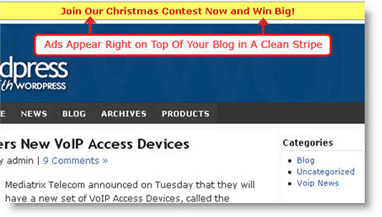
Tip>> Remember, you can subscribe here to receive goodies like this article automatically via email or feedreader!
>> (NOTE! If you enjoy this post, please feel free to share with your friends and twitter it with the tinylink http://tinyurl.com/4zx4ua . Thanks, I appreciate it! Oh, and please feel free to comment below...I love reading what you have to say! -- Barbara)

How to add a Stripe Ad to the top of your blog for free, excellent review

Welcome! If you're new to my site, click HERE to let me show you where the best benefits for yourself are located. Thanks for visiting!

Max Stripe AdMorning!

My gosh, what a day.  Yesterday, that is….right now, it’s just after 4am.  I found myself decimated by an insane desire to get my ebooks

  • 21 Days to a More Profitable Blog
  • 7 Days to Make Your Blog Blossom

completely meshed into my affiliate program, my helpdesk, my forums and the like….and worked thru my beloved adult karate sparring until I ran myself completely past ‘empty’.   But wow, the goodies I managed to create!!

It’s hell taking that rollercoaster ride but oh so satisfying. 

But I digress.  :)

Have you ever noticed that cute little stripe ad at the top of my site that reads:

Subscribe for free to my feed and get the complimentary Secret ebook!

ie,
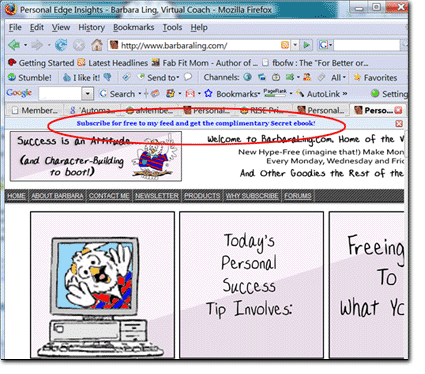
Free ebook

Ever wonder how I do it?

It’s quite easy, actually - it’s the plugin called "MaxBlog Stripe." 

What I like about this plugin is a.) the basic version is free (it’s branded with the developer’s site; I paid to have that link removed as I want to keep the focus on my site intact) and b.), it’s ridiculously easy to configure and use.

Depending upon my specific goals, I’ve used the plugin to advertise affiliate programs, to drive people to my feed, to publicize current happenings and the like.  It’s been part of my blog now for over 2 months and has never given me a problem.  The developer is very responsive regarding questions and the like (and has a suite of other blogging tools you can take advantage of as well, like Psychic Search (also free)).

It’s a super-nifty bit of code - you should definitely try it out for yourself!

Click HERE to download the free plugin.

Enjoy,

Barbara


#BEGIN highlights of this blog writing post:

Beginners blogging tips: The top 1/3" of your blog can be dedicated to a specific link, and the basic plugin is free!

Intermediate and/or Advanced blogging tips: Use the stripe ad to publicize your feed, your contests, your product sites, your conventions…..

#END highlights of this blog writing post


Like this post? Please feel free to tell your friends and Digg It - I very much appreciate your time!

Popularity: 4% [?]

Related posts:

  1. The one CRITICAL mistake many affiliate marketers make
  2. Danger Will Robinson! CommentLuv and Feedburner DANGER and how you can fix it
  3. How to easily cloak your Clickbank and other affiliate links for free
  4. Mindreading 101 - how to deliver EXACTLY what your customers crave
  5. Proactively boost your blog subscription via the Best Benefits Technique

Why not print out and share this post?
Posted on : Jul 02 2008
Posted under 2009 Economy, Make Money |

8 Comments

  1. DavidSNo Gravatar on 02.07.2008 at 06:07 (Reply)

    I’ve seen those stripes at the top of John Chow’s blog too, didn’t realize it was a simple plugin one can use.  Thanks for the info.

    1. BarbaraNo Gravatar on 02.07.2008 at 06:08 (Reply)

      Yes, it’s one of those nifty goodies one can add that really help drive traffic to where you want it to go.

      Thanks for stopping by!

      Barbara


  2. LouiseNo Gravatar (3 comments.) on 02.07.2008 at 12:48 (Reply)

    I had also seen these around the net and wondered how they were implemented.  That’s why I love Wordpress- have a need, find a plugin!
    Also like the way you are using it to “incentivize” your feed subscriptions.

    Louise’s last blog post..Charleston Grill Shrimp and Grits

    1. BarbaraNo Gravatar on 02.07.2008 at 13:09 (Reply)

      Me too!

      Barbara

  3. GaidaNo Gravatar (15 comments.) on 04.07.2008 at 03:13 (Reply)

    Hi Barbara,
    I downloaded and activated the plugin (which I thought was very nifty) & it threw my blog to the left hand side. Tried changing some of the settings for the plugin but still did the same. So I deactivated it.

    They also have a banner plug in as well.

    Will definitely try contacting them to see if problem can be fixed.

    Gaida’s last blog post..Training For the World Rowing U23 Championships


  4. [...] Ad strip on top of blog [...]

  5. Peter LeeNo Gravatar (5 comments.) on 29.08.2008 at 21:51 (Reply)

    Hi Barbara,
    I am not able to access your link when I clicked “Clickhere to download the free plugin”. It says Firefox can’t find the server at stripe.barbaraling.com.Could you check and advise.
    Thanks
    Peter Lee

    Peter Lee’s last blog post..Viral Linkathon

    1. BarbaraNo Gravatar on 31.08.2008 at 10:05 (Reply)

      Hi Peter,

      I just tried it - it works for me. Might you try it again?

      Thanks! Barbara


Leave a comment

