
Is your Wordpress blog naked?
Jul 17th, 2008 | By Barbara | Category: Affiliate Marketing, Coaching, Free Make Money Tools, Insights, Make Money, Make Things Simple
Morning!
The following is something I was going to share with only my newsletter subscribers, but it’s important enough that everyone should know about it.
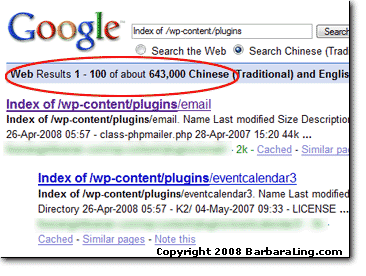
Did you know that by default, Wordpress will reveal all of the plugins you use (free AND paid) to anyone who looks at
http://www.YourDomainName.com/wp-content/plugins
Talk about a pain! Not only is it a security hazard…
Hackers who know of plugin vulnerabilities can scan to see how easy it is to break into your blog
But it also lets people STEAL your plugins as well (you’d be shocked how many plugin zips I’ve seen over the past 48 hours, simply by looking for unprotected plugin directories).
Luckily, the fix for this is quite simple!
Just upload a blank index.html file into your plugins directory (and themes directory as well) and all should be well.
But wait! An opportunity arises as well!
You can also display something like:
Halt! Thou Art Not Allowed Here!
But I invite you to visit my blog whenever you’d like.
Wordpress Plugin Page Enhancement by Barbara Ling
Check out how that works at my plugins directory.
You can grab that index.html page over at plugins-index.txt . Just open that file, copy and paste the contents into a blank index.html, and upload that to your wp-content/plugins directory
(note! if your blog is at /blog or /news or what have you, you’ll have to modify the final destination place).
Thus, do yourself a favor and check out if your Wordpress blog is flaunting itself to the Internet at large….if to, clothe it today! Your blog safety will thank you for it.
Enjoy,
Barbara Ling
Like this post? Please feel free to tell your friends and Digg It – I very much appreciate your time!

Related posts:
- Is YOUR wordpress blog open and inviting thieves? Hat tip to Nicky510
- How to easily cloak your Clickbank and other affiliate links for free
- Mobile marketing – One easy step to make your blog iPhone-friendly
- Affiliate Marketing Blogs – Great For Learning!
- Mindreading 101 – how to deliver EXACTLY what your customers crave


Hey thank you very much for this advice, I going to upload something now
Mr. Javo’s last blog post..By: Mr. Javo
Glad it was useful!
Barbara
It shouldn’t do this if you have the correct directory security. If you don’t allow browsing of a directory, you should get the 404 page that you have set up for your site. You have created a custom 404 page, right?
Michael Carnell’s last blog post..Free Obama Bumper Stickers
I totally agree with you about directory security. And yes, one should always have a custom 404 page –
http://codex.wordpress.org/Creating_an_Error_404_Page
discusses that.
Enjoy, Barbara
Good post, you should also do the same for your “themes” directory, so any old themes cannot be exploited in the same way.
Yep, a very good idea!
Thanks for stopping by,
Barbara
Is your Wordpress blog naked?…
Did you know that by default, Wordpress will reveal all of the plugins you use (free AND paid) to anyone who looks at them?…
STUMBLED!
This is definitely a security issue. I never thought of it before but it makes sense as any directory can be read if there is no index.html file in it.
Good post.
VOTED for this post at:
http://www.newsdots.com/industrynews/is-your-wordpress-blog-naked/
Geoserv’s last blog post..Show us your SezWho/Entrecard blog for 1000 Entrecard credits
Thank you so much! I really appreciate your time.
Best wishes,
Barbara
Also it is best to disallow spiders to crawl the plugins and themes to prevent them from being seen by Google
MarketingDeviant’s last blog post..Win your Employees by Being Humane
Very smart idea! http://thebloggertips.com/how-to-create-robottxt-file/ has some good tips on that.
Enjoy, Barbara
Barbara Ling, Virtual Coach’s last blog post..Cute little peel thingee on blogs – FREE or cheap ways to add it!
[...] to fill her blog with fabulously useful business information and makes me laugh at the same time: Is Your Wordpress Blog Naked? Lillie Ammann is an experienced business woman, writer and editor. Her blog is a must read for [...]
I LOVE the idea of putting up a custom page that lets the searcher know that YOU KNOW what they are trying to do!
UB Funkeys’s last blog post..U.B. Funkeys – Tiki
Indeed!
Thanks for stopping by, Barbara
Barbara Ling, Virtual Coach’s last blog post..Cute little peel thingee on blogs – FREE or cheap ways to add it!
Thanks Barbara for this info.
Coincidentally, I just discovered that I’m a victim of “header spam” on Wordpress. When I went to check my header in my Theme Editor, I found tons of it.
Does anyone know an effective way to block it or deal with it?
Hi Bruce,
Does http://tinyurl.com/5kj83r help?
Let me know, Barbara
Terrific post! You know, a friend of mine went through this on the WordPress forums. It astounded us that WP doesn’t have blank index pages in by default. Obviously when other open source software like ZenCart has the index pages included, they see a good reason for doing so. Thanks for the reminder on this as I don’t think I ever did fix mine up! DOH! lol
Dianne’s last blog post..Free Image Editing & Paint Programs:
It’s really easy to miss on things like this – I was lucky in that my theme by default kept it hidden from the Internet. Glad you found the idea useful, and thanks for stopping by!
Barbara
Hi Barbara thanx for the tip it will save many new publisher who dont have enough knowledge of file protection
you know what many Template hunters use such strings to hack templatemonster.com templates but thanx to index.html i has become next to impossible to find open directory now days
Sunil Pathak’s last blog post..6 Deep Linking Strategies That Actually Works
Hi Sunil,
Thanks for stopping by! It’s always a good thing to share knowledge like that.
Enjoy, Barbara
Hi Barbara!
Funny you should mention this problem…
I recently discussed a few vulnerabilities that have similar easy fixes with WordPress blogs here:
http://ablakeforum.com/index.php/topic,596.0.html
There is also another post related to how to recover from getting hacked.
Hope that is helpful!!
Warmest regards,
Lisa Preston
Lisa Preston’s last blog post..Free Submissions to Directories & Social Networks
Excellent! Thanks so much for the link – I’ll check it out!
Best wishes, and thanks for stopping by, Barbara
[...] week, I wrote the article Is your Wordpress blog naked? which described how the default Wordpress installation leaves your /plugins and /themes directory [...]
[...] Is your Wordpress blog naked? [...]
Thank you for the info! I’m going to check that right away!
Pascale
Coupon shipping’s last blog post..Fashion Bug Coupons
Hi Barbara,
I have run into the issue many times with building websites. If you don’t load an index.html file in the sub-folder or for that matter you root folder, you are at risk of exposing your directory tree and all files.
I have lost many zip files and other video, training materials to hackers or prying eyes.
For any new domain or folder you want to protect, just upload the index.html file. It can be anything in the index.html file.
Hey Barbara,
Thanks for the comment post on my blog, I’m just getting strated so I will be back here to learn from you. Thanks for this post. I will be taking care of this tonight. I’m working on helping local biz owners right now but am working on the Lancaster PA niche. I’ll let you know how it goes.
My pleasure, best of skill for your future endeavors!
Wonderful! Thanks so much.
Excellent advice, just undated my plugins and themes directory with the index page.
Thanks alot for this fantastic information
Glad you find it useful! Barbara
