
Tip>> Remember, you can subscribe here to receive goodies like this article automatically via email or feedreader!
>> (NOTE! If you enjoy this post, please feel free to share with your friends and twitter it with the tinylink http://tinyurl.com/4p34co . Thanks, I appreciate it! Oh, and please feel free to comment below...I love reading what you have to say! -- Barbara)

Mobile marketing - One easy step to make your blog iPhone-friendly

Welcome! If you're new to my site, click HERE to let me show you where the best benefits for yourself are located. Thanks for visiting!

iPhone Friendly Mobile MarketingQUICK! 

My gosh, I’m glad I got your attention! 

Are you aware that you’re most likely losing more customers than….than…..

  • Puzzle pieces in a box!
  • More customers than dandelion seeds in my yard!
  • More customers than toddlers at a pre-school graduation of the state of Texas!

WELL? Golly gee well, DO YOU REALIZE THAT????

Why, no, I’m not hyper at all…why do you ask?  :)

Drop what you’re doing RIGHT NOW…

unless, of course, what you’re doing is imbibing the (and I quote)

Beverage of Life (ie coffee)

and listen up.  Did you know that contrary to popular belief, not everyone accesses your website via Cable with a 32" monitor?  I know, I know, ’tis tough to believe….but there are still folk out there who not only DON’T use cable….they use (insert dramatic musical tone HERE) their mobile phone or smart phone or iPhone or YouPhone or….you get the idea.  :)

Now, as you might imagine, the iPhone screen is a weeeeeeeee bit smaller than your typical computer screen. 

To be precise, it’s 3.5 in, 320×480 PX at 160 ppi!

Can you imagine the unmitigated joy that’s awaiting you if you have to manually make your blog iPhone compatible?  Why, performing a do-it-yourself root canal would pale beside it!

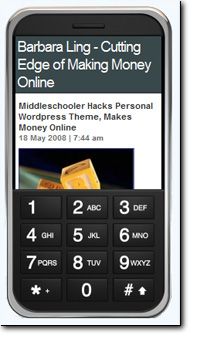
But not to fear, intrepid reader, for by installing one simple Wordpress plugin, you can immediately make your blog display optimally for the iPhone and other smart phone electronics.   And here’s how.

Step 1Step 1.)  Visit Content Robot iWPhone WordPress Plugin Page.

This is where the plugin resides that you’ll upload to your Wordpress blog.   To wit:

…The iWPhone WordPress Plugin and Theme automatically reformats your blog’s content for optimized viewing on Apple’s iPhone and iPod touch. It detects the iPhone/iPod touch’s User Agent and serves up the content with the special theme only to iPhone and iPod touch visitors, all other browsers will view your WordPress blog with your current theme….MORE…

 Once you’re comfortable with what you’re read, move smoothly to:

Step 2Step 2.)  Download the plugin, unzip it and upload it to your /wp-content/plugins directory.

You can download the plugin here.   Follow the instructions you see there.

I told you this would be easy….

And finally….

Step 3Step 3.)  Activate the plugin and….you’re done!

Your site will now automatically detect when potential customers and readers and visitors access it via an iPhone…and display it optimally indeed.

And, I might add….with no further tweaking on your part.

Nice, eh?

Enjoy,

Barbara


#BEGIN highlights of this blog writing post:

Beginners blogging tips:  Install this coolio iPhone Wordpress plugin - no extra tweakies are needed by you to make your site yummy in iPhoneLand.

Intermediate and/or Advanced blogging tips: Explore what other ways you can make your blog iPhone friendly.

#END highlights of this blog writing post


Like this post? Please feel free to Digg It - I very much appreciate your time!

ps - and speaking about the iPhone, did you know you can get them unlocked?



Unlocked Apple iPhone 3G with new 3.0 software! NR|Unlocked and Jailbroken


Apple iPhone 2g 8gb Unlocked and Jailbroken! 3.0!|Includes 3.0 Firmware!


Apple iPhone 8GB 2G with ver 3.0, Unlocked & Jailbroken|


APPLE iPHONE 3GS 3 GS 32GB Officially UNLOCKED BY APPLE|12MTS WAR, WORLDWIDE, BLACK WHITE, 3.0, legally unlock


Apple iPhone 4GB - 2G Unlocked & Jailbroken|Completely Jailbroken + Unlocked. With Case + Charger


Apple iPhone 3G 16GB White *Unlocked & Jailbroken*|Still in warranty! Comes w leather Apple Logo case!


BRAND NEW UNLOCKED APPLE 3G WHITE 16GB IPHONE |SHIPS WORLDWIDE! WORKS ON ANY GSM! SOFTWARE UNLOCKED!!!


Apple iPhone 3G 16GB Unlocked&Jailbroken OS 3.0 Waranty|

Popularity: 11% [?]

Related posts:

  1. Wordpress for iPhone, download now! (PLUS 20 other resources)
  2. Easy way to receive mobile phone messages from your Wordpress blog
  3. Today’s Thought To Share - World’s Most Expensive iPhone
  4. Make money from the future trends of iPhoneMania
  5. Camp Ling, Father’s Day, Unlocked iPhones and more!

Why not print out and share this post?

9 Comments

  1. MarketingDeviantNo Gravatar (8 comments.) on 19.05.2008 at 20:35 (Reply)

    Will the plugin screw up my blog though for people who views it through a computer monitor?

    MarketingDeviant’s last blog post..Business Backup Plan for Financial Crisis


  2. BarbaraNo Gravatar on 20.05.2008 at 03:17 (Reply)

    Hi there,

    Nope, the plugin doesn’t screw up anything - I already have it turned on on this blog. Did you notice it displaying any differently?

    Best wishes,

    Barbara

  3. DianeNo Gravatar on 20.05.2008 at 05:58 (Reply)

    Thanks for the idea! I never realized you could just add a plugin without doing anything else.


  4. Dennis EdellNo Gravatar (47 comments.) on 20.05.2008 at 11:32 (Reply)

    Hey Barbara, being so new to your blog, I never really looked enough to see if it’s changed, sorry :-)

    So you’re saying “The iWPhone WordPress Plugin and Theme automatically reformats your blog’s content for optimized viewing on Apple’s iPhone and iPod touch.” does not mean it will change my theme even an itty bitty bit, right?

    It totally works behind the scenes? So to speak

    Dennis Edell’s last blog post..You Have Spoken - I Have Listened. We Will Have Us An All-In-One Blog Again.

  5. BarbaraNo Gravatar on 20.05.2008 at 11:41 (Reply)

    From what I can tell, nope. My blog looks the same to me when I look at it on me screen, and it looks optimized when I have people check it out on iPhones. If you notice anything different, please do let me know!

    Thanks,

    Barbara


  6. Dennis EdellNo Gravatar (47 comments.) on 20.05.2008 at 12:12 (Reply)

    Letting you know would be second, freaking out would be first lol.

    I paid some decent money for a custom theme.

    Dennis Edell’s last blog post..You Have Spoken - I Have Listened. We Will Have Us An All-In-One Blog Again.

  7. YanNo Gravatar (4 comments.) on 27.05.2008 at 07:02 (Reply)

    Hi Barbara

    Since my blog is iPhone-friendly, I’m struggling to find a way to capture its screen. What software do you use to print yours?

    Yan’s last blog post..The Best Way To Preview WordPress Themes


  8. BarbaraNo Gravatar on 27.05.2008 at 07:40 (Reply)

    Hi Yan, I set up a free account at http://barbaraling.mofuse.mobi/ , snapped the picture via screen capture, and then edited in Photoshop. Hope that helps! Barbara

  9. YanNo Gravatar (4 comments.) on 28.05.2008 at 14:58 (Reply)

    Thanks, Barbara. Appreciate your sharing me the tips. Good site you have it here. I’ll be back to see what’s in store.

    Yan’s last blog post..The Best Way To Preview WordPress Themes


Leave a comment
